
It’s been a long time coming, but Sidos now has AI-powered wall drawing to automatically detect and place walls directly from your floor plans.
Enabling AI Walls
The most efficient way to use AI Walls is to launch a new Design in Sidos Cloud, select Building from the main menu, then navigate to the Walls tab and choose “AI Detect.”
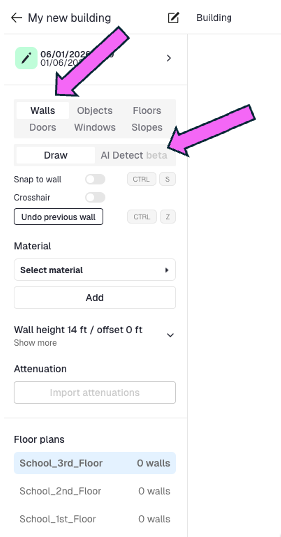
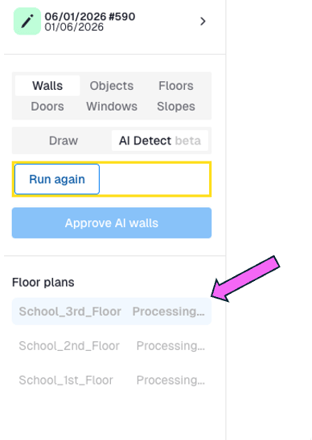
AI wall detection runs in the background and may take a little while to finish. You can continue working on other parts of your project while the walls are being processed. In most cases, floor plans are completed in roughly 20 minutes.
Sometimes walls are hard to detect on PDF-based floor plans. If you run into issues, try swapping the floor plans for PNG, TIFF, or JPEG files.
With Sidos, the images don’t need to match the original pixel count or size, and you won’t lose any existing data. If you need guidance on exporting or converting floor plans, see this help article.
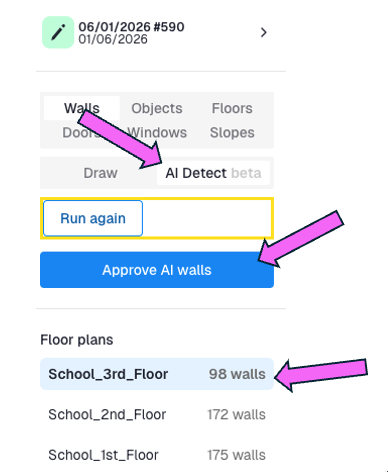
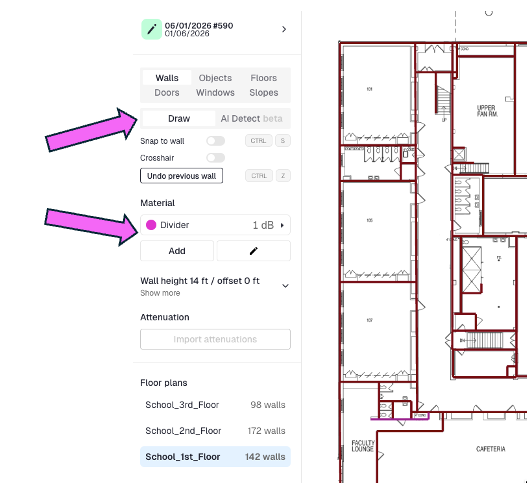
If users need to adjust walls after they’re approved, they return to “Draw,” choose the correct material, and redraw the affected segments. They can also remove any walls that were placed incorrectly from this view.
Reminder: In Sidos, walls persist across your Survey, Design, APoS, and Deep Survey workflows. You can begin with a Design focused on placing walls, doors, and windows, then create a new Survey with those walls already in place for Sidos AI calibration.