
Sidos has introduced a new Ethernet Tester Micro App, the latest addition to the Wave’s on-device toolkit for fast, practical troubleshooting. Integrated directly into the Sidos Wave, this Micro App turns the device into a compact, purpose-built tool for validating wired network infrastructure on site, without additional equipment or complex setup.
Designed for field engineers and installers, the Ethernet Tester Micro App provides an automated workflow to quickly verify that critical aspects of the wired connection are functioning as expected before or during Wi‑Fi work. As soon as the Ethernet cable is connected to the Wave, the Micro App can run through a predefined sequence of basic tests against the wired link. These tests are preconfigured to cover common validation needs, helping users confirm link status and speed, basic connectivity, and other core parameters with minimal interaction.
The experience is intentionally streamlined: the compact interface presents a clear overview of each test in a dedicated “bubble,” allowing the user to see progress and results at a glance. Each test is executed automatically using built-in profiles, reducing the chance of misconfiguration and ensuring consistent behavior across different sites and teams.
To Start
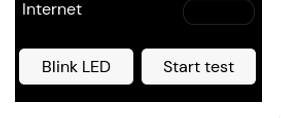
To begin testing, simply connect the Ethernet cable to the Wave. The Ethernet Tester Micro App will detect the connection and automatically start running the predefined tests. When the test sequence is complete, two action buttons are available: one to blink the port LEDs on the connected switch for easy port identification, and another to re-run the same set of predefined tests if you need to verify the results again.
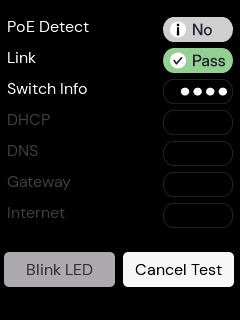
Auto Run Tests
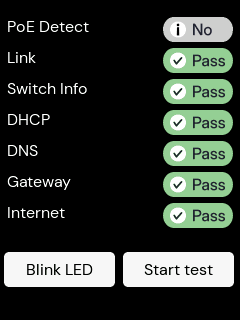
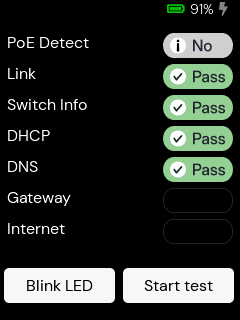
While the tests are in progress, each test bubble displays animated dots to indicate that the check is currently running. When a test finishes, the bubble shows a clear status: a green “Pass” label for a successful result, a grey “No” label where the test is not applicable or did not return a value, or an empty bubble when no result is available. Refer to the screenshots below for visual examples of the pass and fail states.
Tests Complete
Everything Passes:
Internet Fails:
Viewing Detailed Results
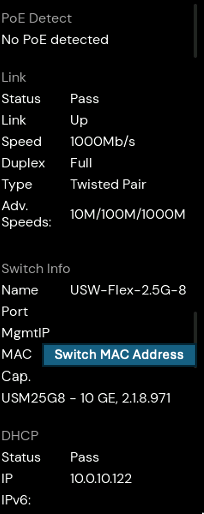
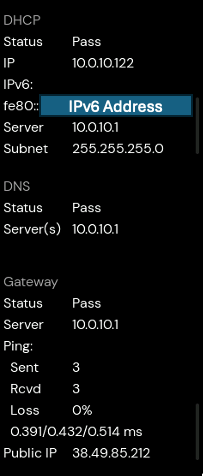
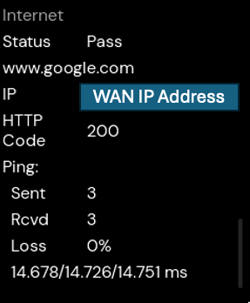
For users who require deeper insights, the Ethernet Tester also includes a detailed results view. By opening the details window, it is possible to review per-test outcomes, see which parts of the wired path may require attention, and use these findings to guide next steps in troubleshooting or escalation. This combination of an automatic test run and an accessible detail view enables quick screening of wired infrastructure issues directly from the Sidos Wave, supporting more efficient and informed decision-making in the field.
Limitations
The Ethernet Tester Micro App is designed for quick, high-level validation of wired connectivity and does not provide:
- Detailed PoE information such as power class or wattage
- Cable certification or individual wire-pair testing
- Support for link speeds above 1 Gbit/s (up to gigabit Ethernet only)